
If you look at your Referrers report, the Direct referrer is most likely the top result in the data table.
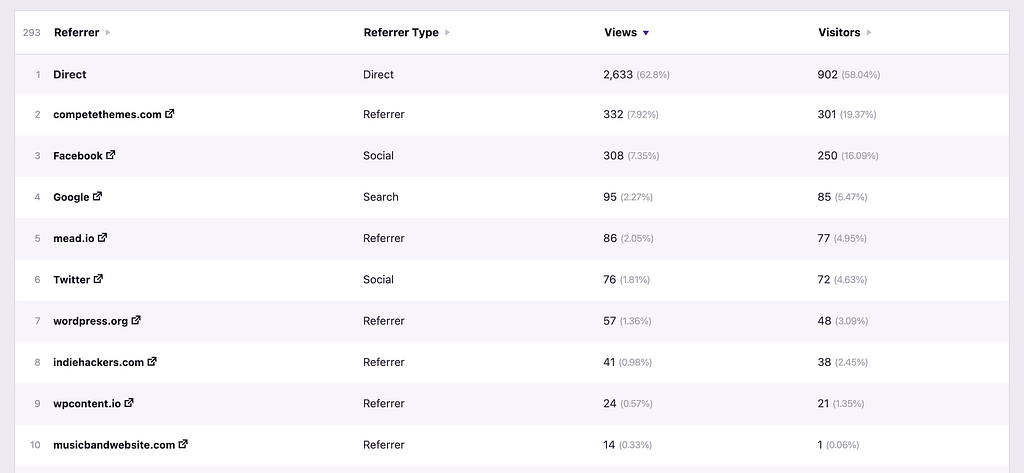
There are a few reasons why a visitor can be attributed to the Direct referrer.
They visited via their browser address bar
Many, if not most, of these visitors are typing your site’s URL directly into their browser address bar. If they have visited your site before, the browser will auto-suggest it to them after typing even a couple of characters into the address bar, which makes it easy to return.
Likewise, they may have a shortcut to your site on their browser’s homepage if they have recently visited.
These are visitors who truly visited your site directly i.e. they didn’t click on a link on another site. However, the Direct referrer also serves as a catch-all when referrer data has been stripped.
The referrer data was stripped
Referrer data is sometimes removed for security or privacy purposes.
For starters, most email clients strip the referrer data from all links, so if you send an email newsletter and someone visits your site via a link in the email, it will most likely show up as a Direct view.
Next, someone may use a privacy-focused browser or browser extension to automatically strip the referrer data from all links they click on.
Lastly, some sites, including those running WordPress, will automatically append the noreferrer attribute to links, which tells the browser not to share the referrer info.
All analytics tools get the referrer data from the browser to find out where a visitor came from. This is the same for Google Analytics, Independent Analytics, and all other website analytics apps.
Is there anything I can do to get more referrer data?
Yes, you can win back some of this data by using UTM parameters when linking to your website, like this:
https://mywebsite.com/?utm_source=Mailchimp&utm_medium=Email&utm_campaign=NewsletterIf you use a campaign link like this in an email newsletter, you would still see traffic show up as Direct in the Referrers report, but you would be able to see exactly how many people clicked on your link via the Campaigns report.
For this reason, it’s a good idea to use UTM parameters whenever you have control over the link.
You can create and track campaign links with the Campaigns feature in Independent Analytics Pro.
