
This feature is only available in the Pro version of Independent Analytics.
You may run into a situation where you need to track a link that redirects to another page on your site.
For example, you might have a link that takes customers to their invoice, like this:
mywebsite.com/?invoice=123 → 301 redirect → mywebsite.com/invoice-123.pdf
Now, imagine you have your link patterns configured like this, to track clicks on PDF files:
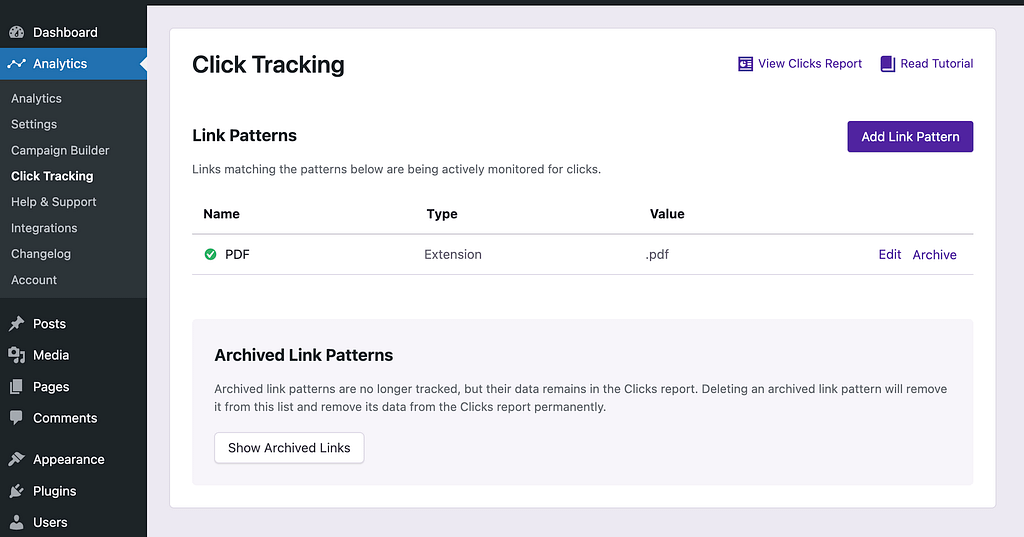
Clicks on the invoice link would not get tracked because the URL the link points to does not end in .pdf. Instead, it redirects to a PDF file. There is no way the tracking script can know there will be a redirect, let alone where that redirect will lead.
There are two ways you could solve this particular case.
First, if you could remove the redirect and link directly to the PDF file, then it would be tracked with the PDF link pattern.
Alternatively, you could create a new Class link pattern and add the tracked class to the invoice link. Then, it doesn’t matter where the URL leads; when the link is clicked, the class is found, and the click gets recorded.
The important takeaway is that you can’t track a link based on the URL it will be redirected to. You have to track the link based on its URL or by adding a tracked class or ID to it.
If you’re unsure how to add a class to a link, follow this guide next: How to Add Classes to Your Links
