
This feature is only available in the Pro version of Independent Analytics.
Independent Analytics Pro can automatically track clicks for over 20+ file types.
- Documents —
pdf,doc,docx,csv,xls,xlsx,epub,txt,rtf - Archives —
zip,gz,rar,tar - Video —
mp4,mov,avi,wmv - Audio —
mp3,m4a,aif,aifc,aiff,wav,aac - Design files —
psd,ai,eps,sketch - Software —
exe,dmg,msi - Image —
png,jpg,jpeg,gif - Presentations —
ppt,pptx
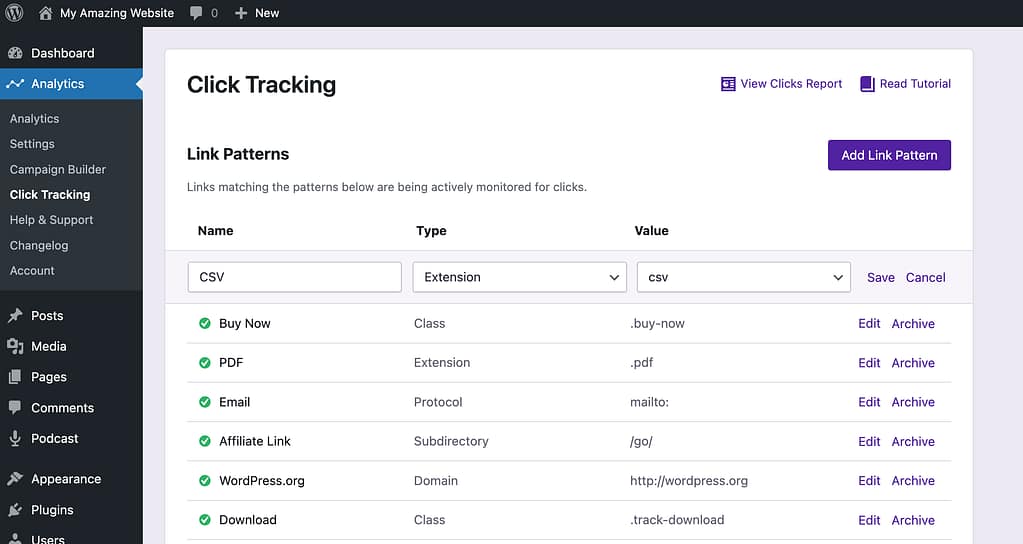
To track clicks on a link pointing to one of these file types:
- Visit the Analytics → Click Tracking menu
- Click the Add Link Pattern button
- Choose the Extension type
- Select the file extension you want to track
- Save the new link pattern
Tracking clicks on images
Clicks aren’t counted if a visitor clicks on an image. They are counted when someone clicks on a link pointing to an image. This could be a text link or an image link. For instance, if you add an image to your article and link it to the full-size image, clicks on this image link will be tracked.
Still have questions?
For help with Pro features or pre-sale questions, please reach out via our contact page.
