
This feature is only available in the Pro version of Independent Analytics.
Forms added with Superb Addons are not tracked automatically, but can be tracked with a few manual edits to the form block.
First, add a hidden field to the form. Then, with the hidden field selected, open the Advanced section and enter iawp-form-id into the Custom Field Name input. Lastly, enter a number into the Default Value input. This number will serve as the form’s ID.
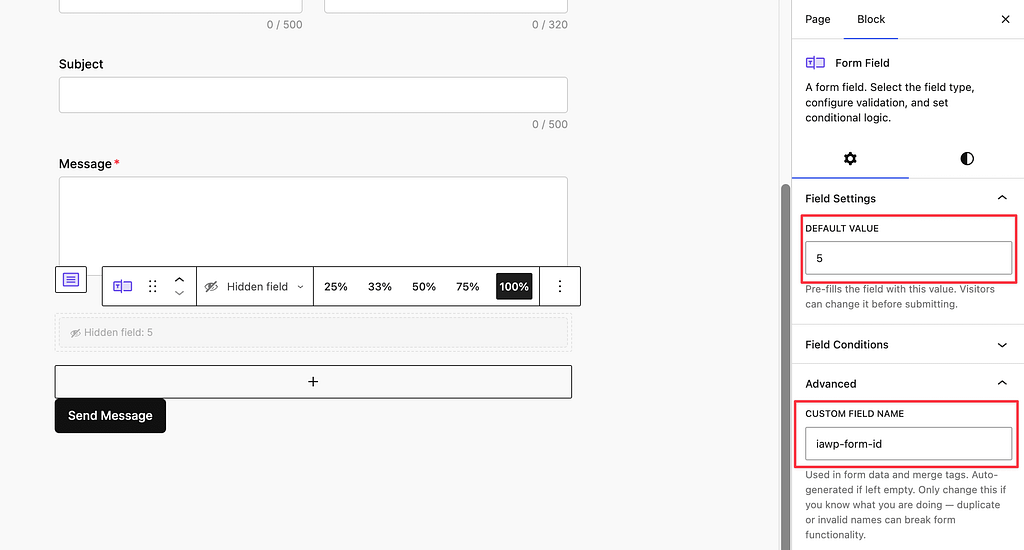
With this hidden field added, Independent Analytics Pro will record every submission. The form will show up in the analytics once the first submission is recorded.
Tracking multiple forms
You can repeat these same steps for every form you want to track. When you add the hidden field to other forms, make sure to give each one a unique ID value. For instance, the form in the screenshot above is using 5, so the next form could use 6. Repeating the same ID on two forms will cause IA Pro to track them as a single form.
Editing the form name
The name that shows up in the analytics comes from the Form Name field.
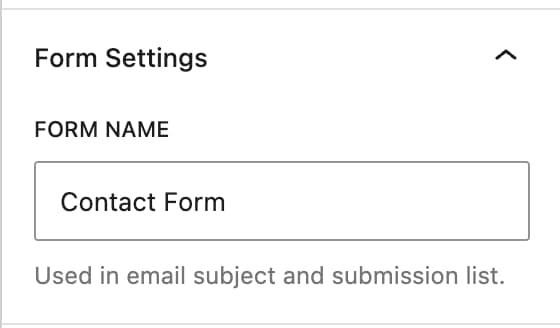
After changing the form’s name, Independent Analytics Pro will update it in the analytics after the next submission is recorded.
For help with Pro features or pre-sale questions, please reach out via our contact page.
