
This feature is only available in the Pro version of Independent Analytics.
We are not lawyers, and this is not legal advice 🙂
It’s important to understand that the User Journeys feature does not record any data itself. Rather, this feature gives you an interface with a novel way to view and explore your data.
In other words, this feature does not add any new privacy implications on its own, but rather highlights an existing issue, which is the ability to cross-reference data sources.
This is easier to understand with an example, so take a look at this session shown in the User Journeys report:
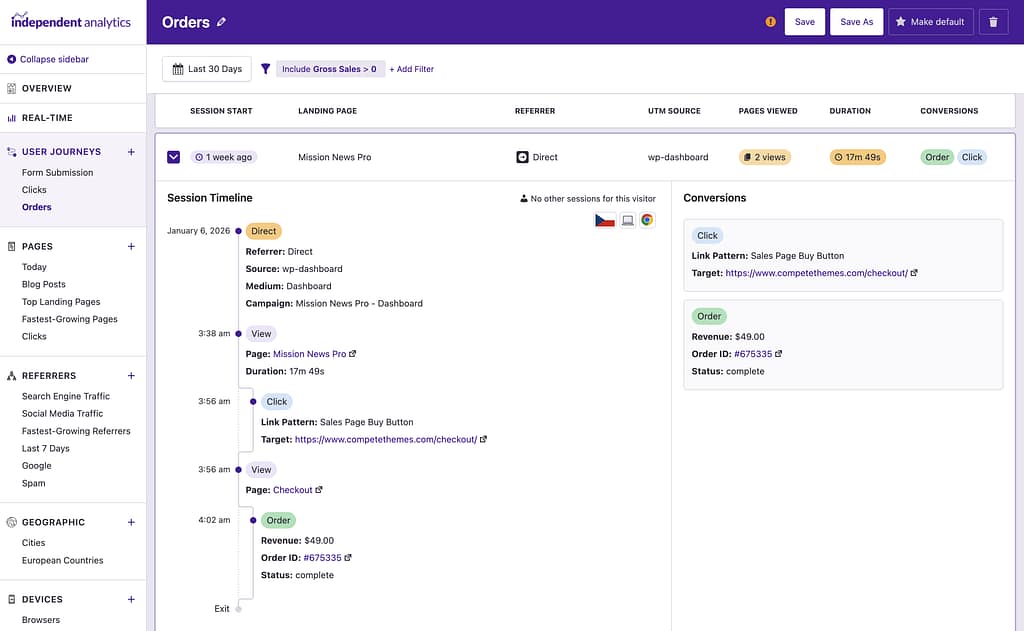
You could not know who this customer is based on what is shown here (or stored in the database tables).
However, you can see that the order happened at 4:02am, and if you were the store owner, you could easily find which sale took place at that time. For eCommerce transactions, there is also a link to the order page, which removes any ambiguity.
When you view the order page, you can plainly see the personal data of this customer, so there is no longer any question who this visitor is. This essentially makes their data in the User Journeys report personal data as well, by association.
In the User Journeys report, you can see their browsing history on your site from before the sale, their approximate geolocation, device type, browser, and the referrer/campaign info. If they have visited the site before, you may see previous sessions, but identifying individuals over time is not always reliable.
The big picture is that while Independent Analytics Pro does not collect personal data, the User Journeys report makes it easier to cross-reference your analytics data with personal data collected via other means, which can thus turn some data recorded by IA Pro into personal data. Again, this is not a new issue and was always possible via looking at your database tables directly for timestamps, but the User Journeys report makes it easier.
If your site does not collect any personal data, i.e., it has no forms, then this will not be a concern. It will never be possible to identify someone via User Journeys or by examining the database tables directly.
If your site does collect personal data, i.e., you have forms, then it’s important to outline what you track in your privacy policy.
Below every form on your website, you could include a required checkbox that says the user agrees to your privacy policy. In your privacy policy, you could let them know what other data you may be able to find out about them via manual cross-referencing with your analytics. The user can review this information and, once informed, decide whether or not they would like to proceed with submitting the form.
