


You can set up conversion tracking for WordPress forms without writing any code by using an analytics plugin that automatically detects form submissions.
Independent Analytics Pro integrates with popular form plugins out of the box — just activate it, and your form submissions will be tracked with full attribution data.
If you have contact forms, quote request forms, or lead magnets on your site, you probably want to know how many submissions you’re getting and where those leads are coming from. The traditional approach involves Google Tag Manager, custom JavaScript events, and GA4 configuration. That’s a lot of setup for something that should be simple.
With a WordPress plugin like Independent Analytics Pro, there is no configuration at all. This is possible because its form-tracking feature integrates directly with your form plugin, so submissions are automatically tracked with perfect accuracy.
Do I need Google Tag Manager to track form submissions?
No, you don’t need Google Tag Manager at all if you track your forms with a WordPress analytics plugin instead.
With GTM, you typically have to create a trigger that fires when a form is submitted, set up a tag that sends the event to GA4, and then configure GA4 to recognize that event as a conversion. If your form uses Ajax submission instead of a page redirect, you may need additional configuration to detect the submission.
Independent Analytics Pro skips all of that. Because it runs inside WordPress alongside your form plugin, it can detect submissions directly.
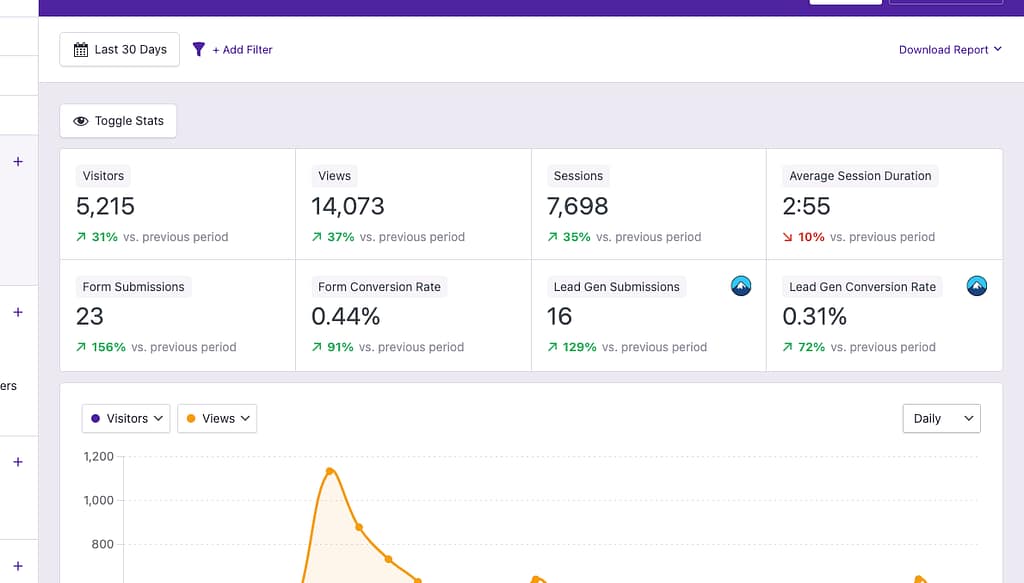
There’s no need for GTM, JavaScript snippets, or any event configuration. You install the plugin, and form tracking is already working. The same is true if you want to track file downloads or button clicks – IA Pro handles those without code, too.
Can I track form submissions as goals without GA4?
Yes, you can track the submissions without using GA4 at all. Independent Analytics Pro includes a Forms report that tracks every submission automatically.
You can see the number of form submissions for each page, referrer, country, device, and more. It’s the same kind of conversion data you’d set goals for in GA4, but without the setup.
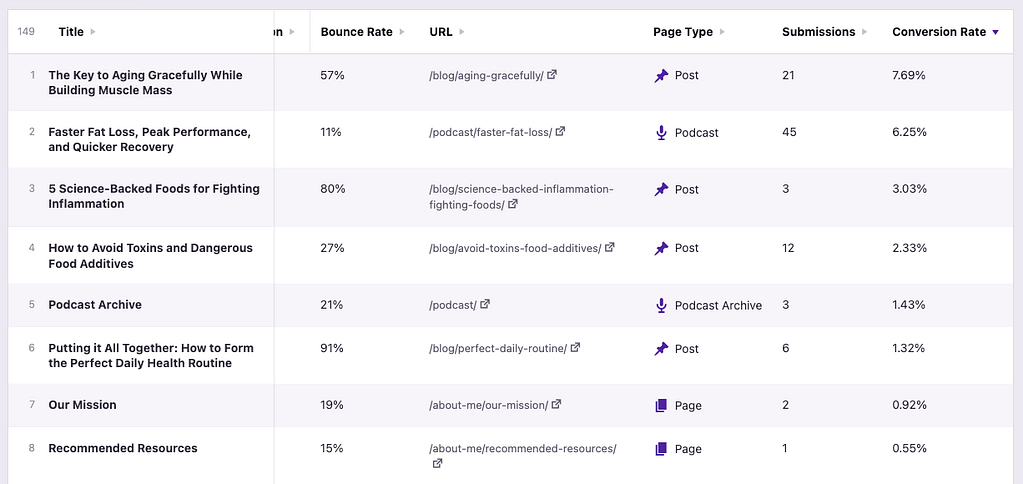
In GA4, tracking form submissions as conversions requires creating a custom event, marking it as a conversion, and verifying that the data is flowing correctly. This can become really complicated if you have some forms that handle submissions via Ajax and other forms that use “Thank You” pages for conversion tracking.
Which WordPress form plugins support automatic conversion tracking?
Virtually all form plugins support automatic tracking because they fire a “WordPress hook” when a submission takes place. This allows other plugins to monitor the hook and run their own code when a submission occurs.
Independent Analytics Pro integrates with almost all popular WordPress form plugins. The full list includes:
- ARForms
- Amelia
- Avada Forms
- Bit Form
- Breakdance
- Bricks Builder
- Contact Form 7
- Convert Pro
- Core Forms
- Divi
- Elementor Pro
- Everest Forms
- Fluent Forms
- Formidable Forms
- Forminator
- Gravity Forms
- Hustle
- JetFormBuilder
- Kadence Blocks
- Kali Forms
- MailOptin
- MailPoet
- Mailchimp for WordPress
- Newsletter
- Ninja Forms
- Request a Quote for WooCommerce
- Superb Addons
- SureForms
- Thrive Leads
- WP Store Locator
- WPForms
- WS Form
If you’re using one of these plugins, you can track your forms without any manual configuration.
If there’s a form plugin you want us to integrate with, message us here.
How do I see which traffic source led to a form submission?
You can find this data in the Referrers report in Independent Analytics Pro. All you have to do is enable one of the form submission columns in the data table, and you’ll see the submissions for each traffic source.
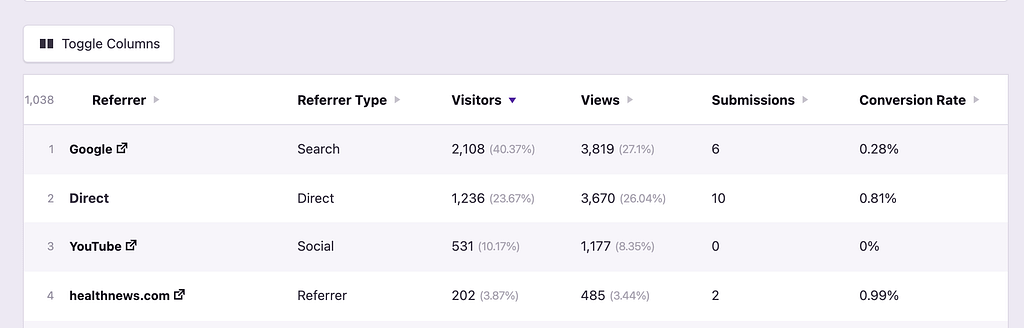
You can also open the Campaigns report to see form submissions broken down by UTM parameters. This is especially useful if you’re running paid ads or email campaigns and want to know which ones are actually generating leads.
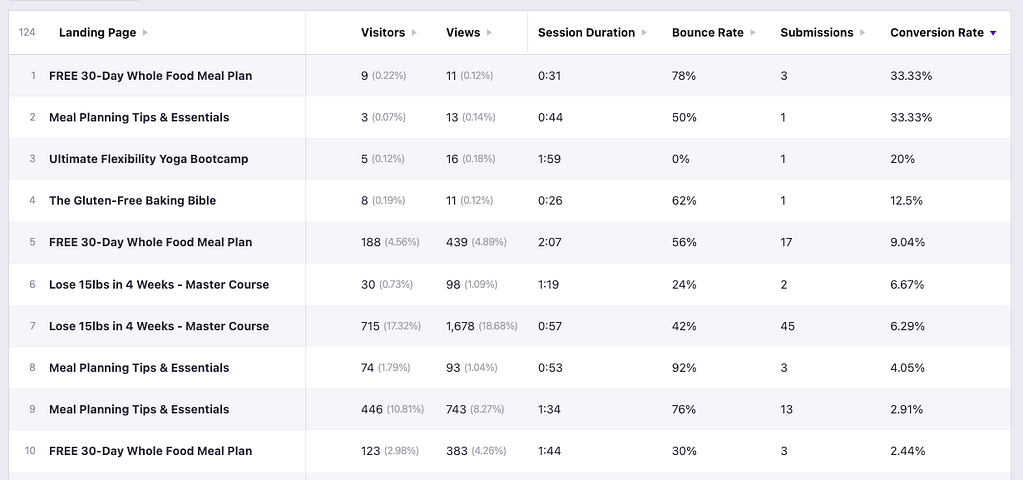
For even more detail, you can open a Solo Report for any individual referrer or campaign to see which specific forms were submitted by visitors from that source.
This is the kind of data that makes form tracking actually useful. Knowing you got 50 form submissions last month is fine, but knowing that 30 of them came from a specific blog post or ad campaign is what helps you make better decisions.
What’s the difference between tracking form submissions and tracking thank-you pages?
Some people track form conversions by counting visits to a thank-you page that appears after submission. This can work, but it has a few problems.
First, if someone bookmarks the thank-you page or shares the URL, those visits get counted as conversions even though no form was submitted. Second, if your form uses an inline confirmation message instead of a redirect, there’s no thank-you page to track at all. Third, you’re adding an extra step to your funnel that isn’t necessary.
Tracking actual form submissions is more reliable. Independent Analytics Pro detects the submission event itself, so it doesn’t matter whether your form redirects to a new page or shows a message inline. Every submission is counted accurately regardless of how your form is configured.
Can I track conversions from specific forms separately if I have multiple forms on my site?
Yes! Independent Analytics Pro tracks each form individually, so if you have a contact form on one page and a quote request form on another, you can see the submission data for each one separately.
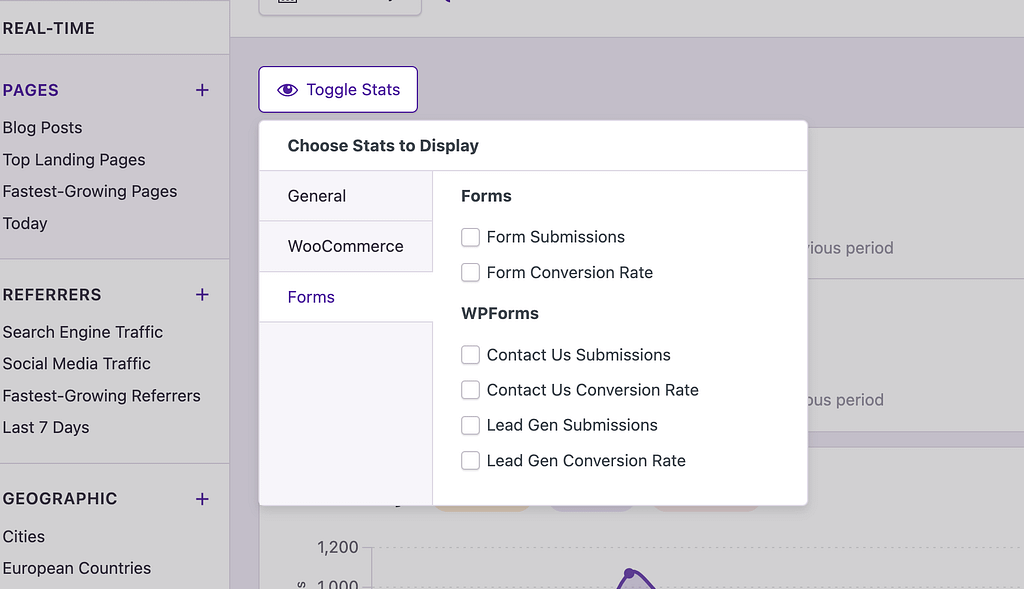
This is useful if you’re testing different form placements or designs. Instead of guessing which form setup works best, you can check the data and see exactly how each form is performing.
Are there any forms that can be tracked with GTM but not a WordPress analytics plugin?
Yes, GTM and GA4 can track forms embedded via an iframe, whereas WordPress plugins like Independent Analytics Pro cannot.
This is because IA Pro is monitoring submissions via PHP, and the iframe does not run any server-side code. For instance, if you get an HTML form directly from Mailchimp and embed it on your site, it won’t be trackable with IA Pro.
However, the plugins that IA Pro integrates with all have integrations with Mailchimp and other email marketing services. You would create your forms with a plugin, like Mailchimp for WP, which integrates with Mailchimp. This plugin will give you nicer, more customizable forms than the ones provided by Mailchimp, and it allows Independent Analytics Pro to track your submissions.
Tracking WordPress form submissions without code is simple with the right tools. All you need is a form plugin and an analytics plugin like Independent Analytics Pro to track the submissions automatically for you. You can click here to learn more about the codeless form tracking feature.
