

You can track file downloads and clicks on your WordPress site by using an analytics plugin like Independent Analytics Pro, which monitors link clicks to downloadable files like PDFs, zips, and other documents. We use it on our own site to track clicks on buttons like the Download button you see in the header.
If you’re offering downloadable resources on your site, whether that’s lead magnets, documentation, media kits, or software, you probably want to know which files actually get downloaded.
Google Analytics can track downloads if the links point directly to the file, but otherwise, it requires adding custom JavaScript to your site. Using a WordPress plugin can make download tracking much simpler.
How does the download tracking work in Independent Analytics Pro?
Independent Analytics Pro has a Click Tracking feature where you choose which file types you want to track. For instance, if you want to track clicks on PDF files, you add a new link pattern for the PDF file extension, and all links pointing to PDF files on your site will be tracked.
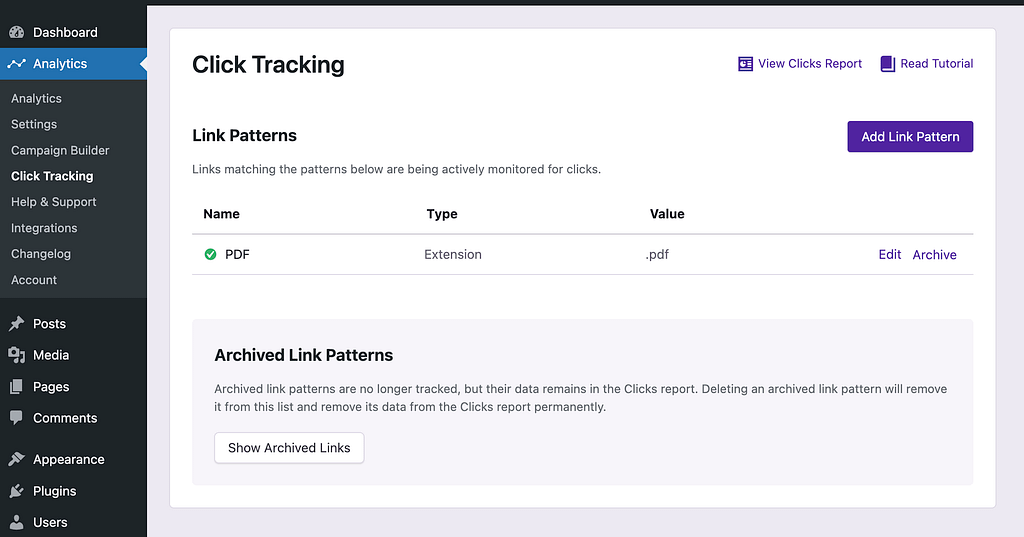
If you want to track clicks to another filetype, like zip files, you can add another link pattern for the .zip file extension. It takes seconds to set up, and there is no other configuration required.
Where do I see the clicks and download counts in my WP dashboard?
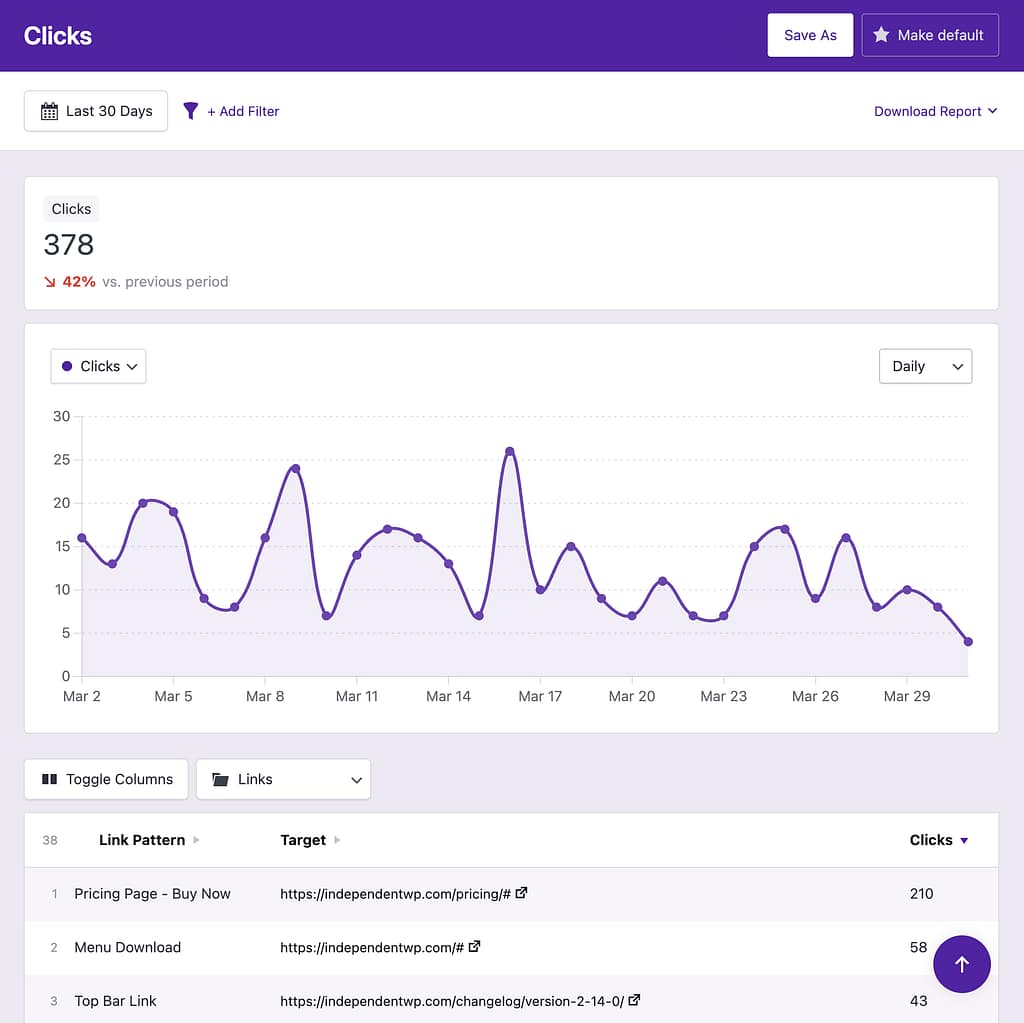
Independent Analytics Pro adds a Clicks report to the Analytics menu, where you can see all the clicks on your downloads. You can see the number of clicks for each day in the chart and the clicks on each individual file in the table below.
Here’s an example from our own Clicks report:
Can I see which PDFs or files get downloaded the most?
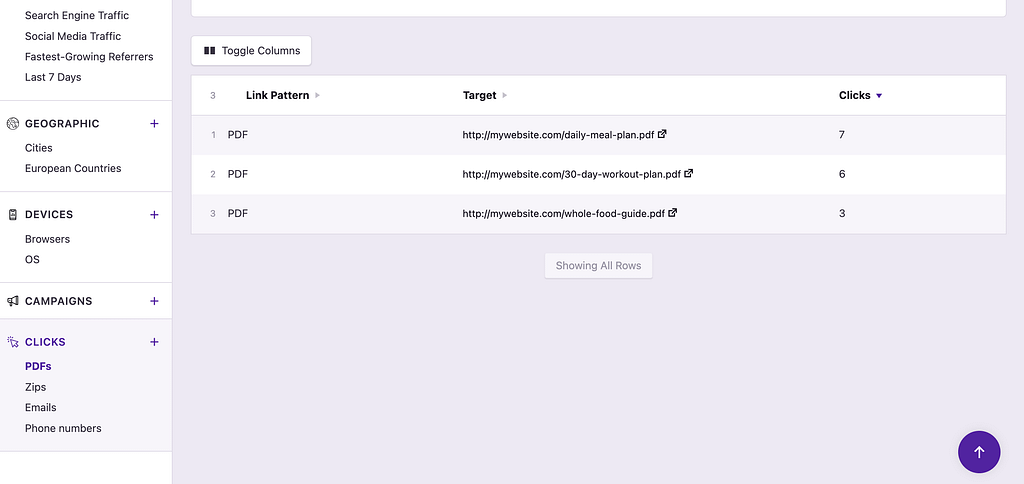
Yes, you can see this easily in the Clicks report added by Independent Analytics Pro. The data table lists every unique file that was clicked, so you can compare them.
Can I see which traffic sources lead to the most downloads?
Yes, the Clicks metric is available across all reports in Independent Analytics Pro, not just the Clicks report. This means you can open the Referrers report or Campaigns report to see which sources are driving the most clicks.
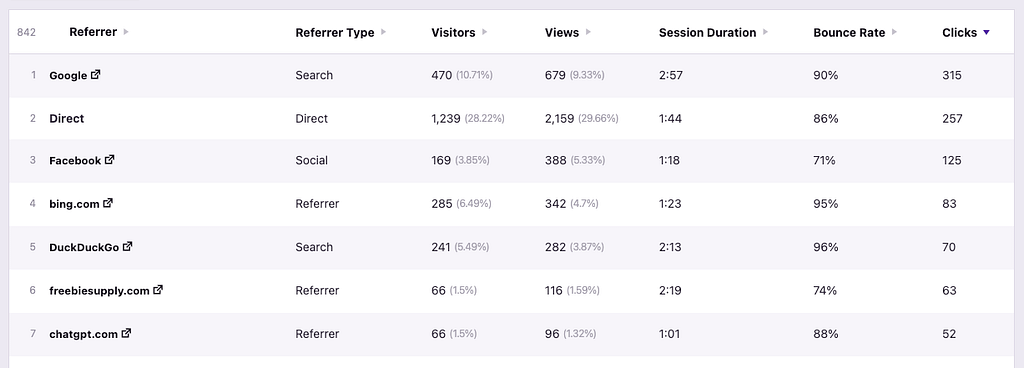
This data reveals the total clicks from each source but does not tell you exactly which links were clicked. For that, you can open a Solo Report for any individual traffic source, and then you can see how many clicks each one of your downloads got from that source.
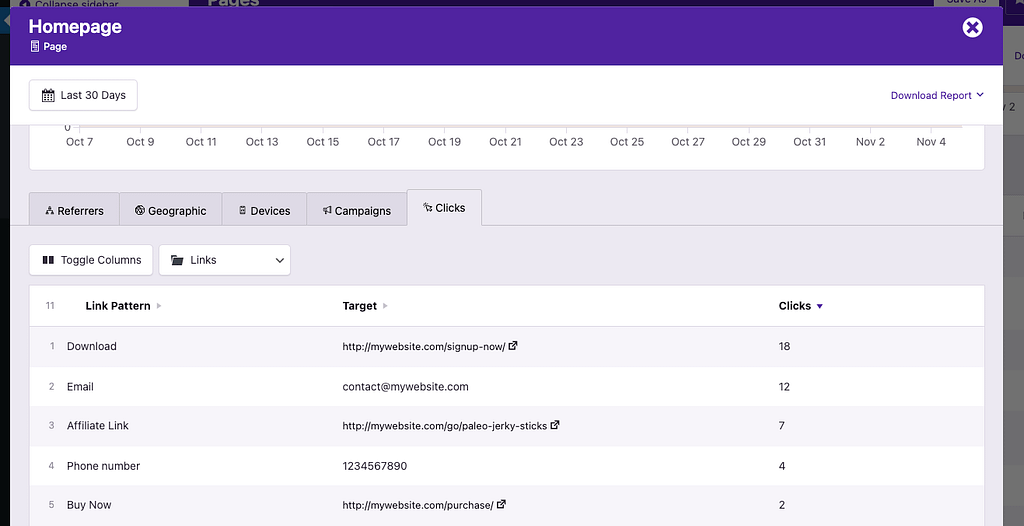
This is far more actionable than just knowing how many downloads you got. It tells you which websites and specific UTM campaigns are netting you the most clicks. Using this data, you can double down on the sources driving the most clicks and avoid wasting time on those that are underperforming.
Can I see which pages on my site generate the most downloads?
Yes, since the Clicks metric is available in the Pages report, you can enable the Clicks column and sort by it to see which pages drive the most file downloads.
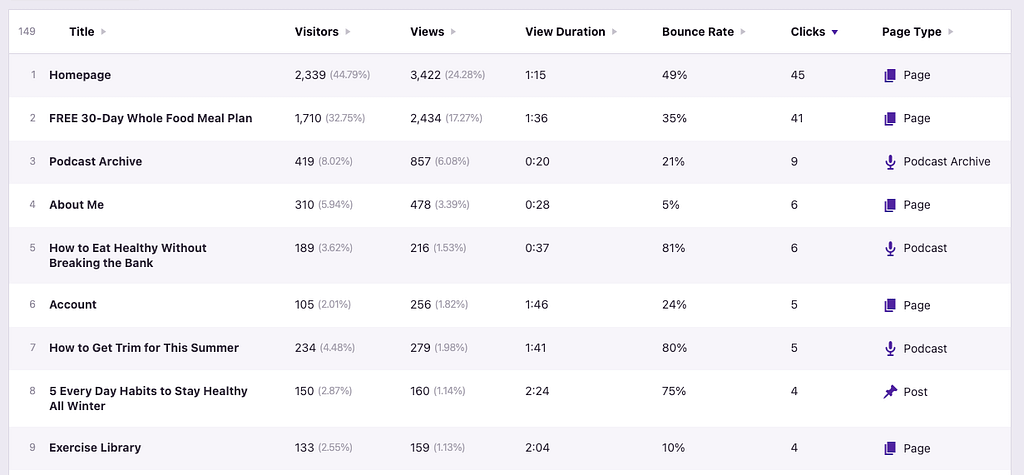
This is particularly useful if you have download links spread across multiple pages, like blog posts, landing pages, and resource hubs, and want to know which pages are actually converting visitors into downloaders.
To see exactly which files were clicked on, you can open a Solo Report for any individual page.
What file types can I track beyond PDFs?
Independent Analytics Pro supports tracking for a wide range of file types. You can track clicks for the following filetypes:
- Documents —
.pdf,.doc,.docx,.csv,.xls,.xlsx,epub,txt,rtf - Archives —
.zip - Video —
.mp4,mov,.avi,wmv - Audio —
.mp3,m4a,aif,aifc,aiff,.wav - Design files —
.psd - Software —
.exe - Image —
png,jpg,jpeg,gif - Presentations —
ppt,pptx
You can track as many of these patterns as you need without limits.
Beyond file extensions, the plugin also automatically tracks clicks on email links (mailto:), phone links (tel:), and SMS links (sms:), which is useful if you’re using downloads as part of a lead generation funnel and want to track how often people reach out to you.
As long as the link points directly to the file URL, it will be tracked automatically. If the download button does not point to the file URL, you can track the clicks by adding a class to the button instead.
Independent Analytics Pro uses a completely code-free system. Instead of adding JavaScript snippets or modifying your theme files, you create “link patterns” in the Click Tracking menu. These patterns tell the plugin which links to monitor.
There are several pattern types you can use:
- File extension — Track all links pointing to a specific file type, like
.pdfor.zip. This is the easiest way to track downloads across your entire site with one pattern. - CSS class — Add a class to a specific button or link, type that class name into the Click Tracking menu, and clicks on that element are tracked. No JavaScript required.
- ID — Add an ID to a button or use its existing ID to track it.
- Subdirectory — If your downloadable files are stored in a specific folder like
/downloads/, you can track all links pointing to that path. - Protocol — Track clicks on phone, SMS, and email links.
- External domain — Track clicks to files hosted on external services like Dropbox or Google Drive.
- External — Track clicks on any external links regardless of the domain.
This means you can go from zero download tracking to full coverage in minutes, without touching a single line of code.
The form tracking feature in IA Pro works the same way, allowing you to track form submissions without code.
Does download tracking slow down my WordPress site?
Nope! Independent Analytics Pro is built for performance. When a visitor clicks a tracked link, the click data is saved to a file in milliseconds rather than making a database request. The plugin then syncs that data to the database once every 60 seconds.
This means there is no perceptible delay when a visitor clicks a download link. The file still downloads instantly, and the click is recorded in the background. You can track five links or five thousand the performance impact is the same.
Tracking downloads and file clicks on your WordPress site doesn’t require Google Tag Manager or custom JavaScript. With Independent Analytics Pro, you can set up code-free click tracking in minutes and see results fast. Click here to get started.
